Skip to content
£5 welcome credit + 5% cashback. Welcome credit on orders of £50+. Shop now
VSTmarketplace

Antares AutoTune Pro 11

No reviews yet. Be the first to review

New here? Get £5 to spendFor an order of £50 or more, kept in your wallet

£299.00

Earn £14.95 back in your wallet

One-time payment, no subscription. Your downloads are kept in your account.

Choose Your System:
  • 5% back in your wallet on every order, to spend next time
  • Digital delivery to your account as soon as payment is confirmed
  • Your downloads stay in your account, ready whenever you need them again
  • 3-day refund if you have not downloaded yet. Refund policy

Questions about this product? Ask our support team.

AutoTune Pro 11 is Antares' professional pitch correction plug-in, with Graph Mode editing, the classic AutoTune effect and ARA2 support.

Antares AutoTune Pro 11 is a professional pitch correction plug-in for detailed, note-by-note vocal tuning in Graph Mode, plus the classic automatic AutoTune effect. It is for producers, engineers and vocalists who want precise control over pitch, retune speed, vibrato and formant. It runs as a VST3, AU or AAX plug-in on Windows 10 and 11 and on macOS 14 or higher, native on Apple Silicon.

What is AutoTune Pro 11?

AutoTune Pro 11 is the current Pro edition of Antares’ pitch correction software. Many people still search for it as Auto-Tune Pro; Antares now writes the name without the hyphen. The latest update, 11.6, improves session stability and compatibility and adds support for macOS 26 Tahoe.

Key features

  • Graph Mode for precise note-by-note editing of pitch, retune speed, vibrato and formant
  • Classic AutoTune effect for automatic pitch correction
  • ARA2 in Logic, Studio One and Cubase/Nuendo: the vocal loads instantly with no tracking, and the Graph Mode timeline stays in sync with your DAW
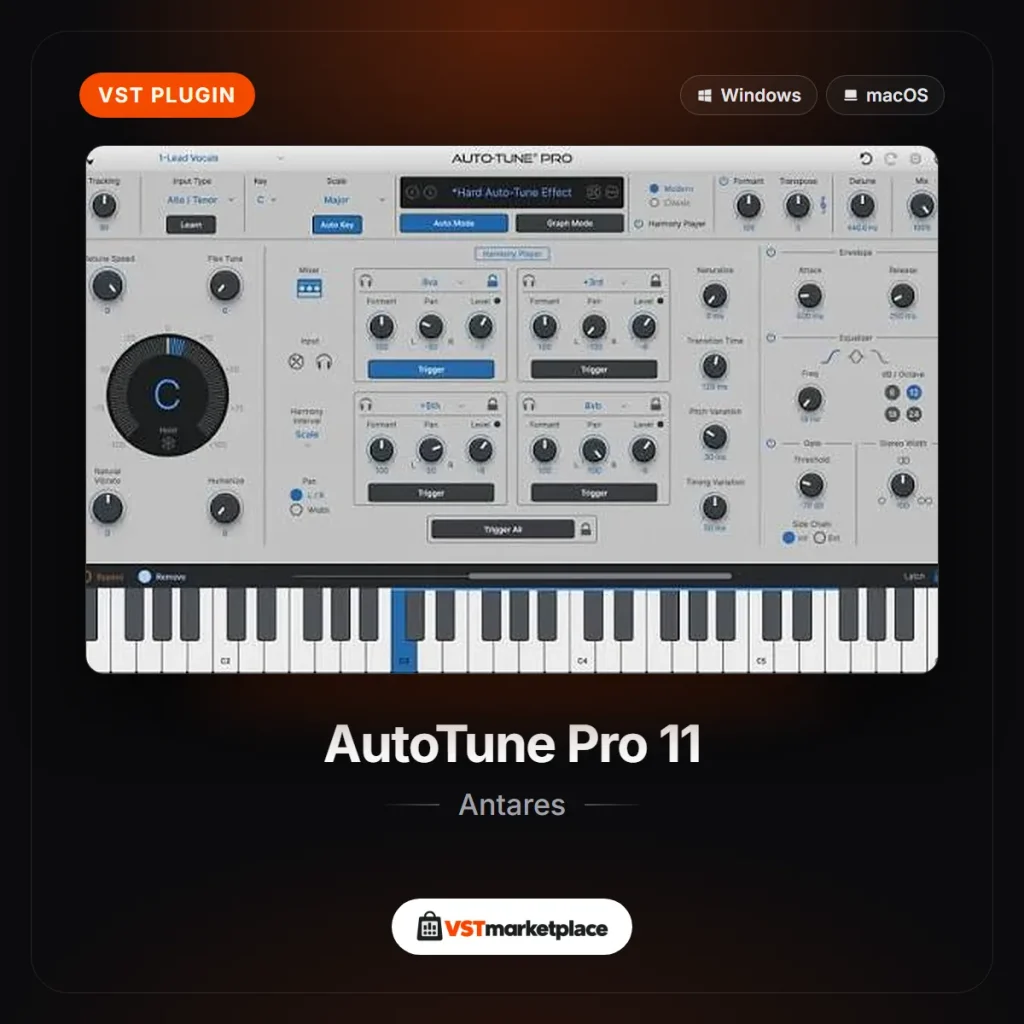
  • 4-part Harmony Player powered by the Harmony Engine: four MIDI-triggerable harmonies with formant, pan and level controls, plus master EQ, envelope, gate and stereo width
  • Smart MIDI mapping: right-click a control and move a knob, fader or pad to assign it
  • Multi-View to switch between AutoTune tracks in one window
  • Artist presets and an updated Presets Manager

Which AutoTune edition to choose

  • AutoTune Pro 11: detailed manual vocal editing with Graph Mode
  • AutoTune Advanced: automatic tuning and real-time performance, with natural vibrato and a low-latency Live mode
  • AutoTune: fast, streamlined automatic tuning with fewer controls

Pick Pro 11 if you want to edit vocals note by note as well as use the automatic effect.

System requirements

  • Windows: Windows 10 and 11; VST3 or AAX
  • macOS: macOS 14 or higher (Sonoma, Sequoia and Tahoe); native on Apple Silicon; AU, VST3 or AAX
  • DAWs: Ableton Live, Cubase, FL Studio, Logic Pro, Pro Tools and Studio One

Browse more vocal plug-ins or everything from Antares.
Specifications

Specifications
BrandAntares Audio Technologies
DAWAbleton Live, Cubase, FL Studio, Logic Pro, Pro Tools, Studio One
FormatAAX, Audio Unit, VST3
SystemmacOS, Windows
Latest version11.6
Minimum OS versionWindows 10 / macOS 14
CPU architecturex64, native Apple Silicon on Mac

Frequently asked questions

What is the latest version of AutoTune Pro?

AutoTune Pro 11 is the current Pro edition. Its latest update, 11.6, improves session stability and compatibility and adds support for macOS 26 Tahoe.

Which DAWs does AutoTune Pro 11 work with?

Antares lists Ableton Live (AU, VST3), Cubase (VST3), FL Studio (AU, VST3), Logic Pro (AU), Pro Tools (AAX) and Studio One (AU, VST3).

Does AutoTune Pro 11 support ARA2?

Yes, in Logic, Studio One and Cubase/Nuendo. The vocal loads instantly with no tracking, and Graph Mode stays in sync with the DAW timeline.

Does AutoTune Pro 11 run on Apple Silicon?

Yes. AutoTune Pro 11 is native on Apple Silicon and needs macOS 14 or higher.

What is the difference between AutoTune Pro 11 and AutoTune Advanced?

Pro 11 is built for detailed manual vocal editing in Graph Mode. Advanced focuses on automatic tuning and real-time performance, with natural vibrato and a low-latency Live mode.

Can AutoTune Pro 11 create harmonies?

Yes. Its 4-part Harmony Player, powered by the Harmony Engine, adds up to four harmonies that you can trigger by MIDI.

Reviews

No reviews yet. Bought this product? Be the first to share what you think.

Be the first to review Antares AutoTune Pro 11

Your email address will not be published.

Your rating *

Guides for Antares AutoTune Pro 11

All posts
Auto-Tune Pro 11 pitch correction interface by Antares on the VSTmarketplace product image
Antares AutoTune Pro 11 £299.00