Skip to content
£5 welcome credit + 5% cashback. Welcome credit on orders of £50+. Shop now
VSTmarketplace

Celemony Melodyne 5 Studio

No reviews yet. Be the first to review

New here? Get £5 to spendFor an order of £50 or more, kept in your wallet

£399.00 £499.00 You save £100.00

Earn £19.95 back in your wallet

One-time payment, no subscription. Your downloads are kept in your account.

Choose Your System:
  • 5% back in your wallet on every order, to spend next time
  • Digital delivery to your account as soon as payment is confirmed
  • Your downloads stay in your account, ready whenever you need them again
  • 3-day refund if you have not downloaded yet. Refund policy

Questions about this product? Ask our support team.

Celemony Melodyne 5 Studio is the complete Melodyne edition: note-based pitch and timing editing for vocals, instruments and chords, across many tracks.

Celemony Melodyne 5 Studio is the complete edition of Melodyne, the note-based editor for the pitch, timing and sound of recorded audio. It is for producers, mix engineers and singers who want to correct or reshape vocals, instruments and even single notes inside chords. It runs on Windows 10 or 11 and on macOS 10.12 or higher, native on Apple Silicon, as a stand-alone program or as a VST3, AU or AAX plug-in.

What is Melodyne 5 Studio?

Melodyne finds the notes in a recording and lets you edit each one: its pitch, timing, length, vibrato, formants and volume. Melodyne 5 is the current version, now at 5.4.2. Studio is the top of the four Melodyne 5 editions and the only one with the multi-track window, so you can edit the notes of as many tracks as you like in one place. In DAWs with ARA support, Melodyne works directly inside your session; what ARA can do depends on the DAW.

Key features

  • Note-based editing of pitch, timing, duration, vibrato, formants and dynamics
  • DNA (Direct Note Access): edit single notes inside chords on piano or guitar
  • Multi-track window and multitrack note editing (Studio only)
  • Track-spanning macros for pitch, timing and dynamics, and quantise to a reference track (Studio only)
  • Sound Editor for changing timbre through the overtones (Studio only)
  • Chord Track, chord recognition and Chord Grid for pitch editing
  • Improved Melodic algorithm that treats pitched and noise parts separately, with de-esser functions for sibilants
  • Fade Tool, Leveling Macro and the Percussive Pitched algorithm
  • Audio-to-MIDI export
  • Opens Melodyne 4 projects

Which Melodyne 5 edition is this?

Melodyne 5 comes in four editions, each with everything from the one below it:

  • Essential: the Main Tool for pitch, timing and note length, macros and the Chord Track
  • Assistant: adds the full toolkit (vibrato, formants, dynamics), inspectors and audio-to-MIDI export
  • Editor: adds DNA for notes inside chords, plus extended tempo and scale functions
  • Studio: adds the multi-track window, multitrack note editing, track-spanning macros and the Sound Editor

This page is Melodyne 5 Studio, the complete edition. Projects are compatible between editions.

System requirements

  • Windows: Windows 10 (64-bit) or Windows 11; Intel or AMD dual-core CPU (quad-core recommended); 4 GB RAM (8 GB recommended); ASIO audio hardware
  • macOS: macOS 10.12 or higher; Intel dual-core CPU or Apple Silicon (native since version 5.2); 4 GB RAM (8 GB recommended)
  • Formats: stand-alone, VST3, AU and AAX, with ARA in compatible DAWs

In Logic Pro on Apple Silicon, ARA is not fully supported natively; Celemony recommends running Logic under Rosetta for it.

Want the automatic tuned-vocal effect as well? See Antares AutoTune Pro 11. Browse more vocal plug-ins or everything from Celemony.
Specifications

Specifications
BrandCelemony
DAWAbleton Live, Bitwig Studio, Cubase, FL Studio, Logic Pro, Pro Tools, REAPER, Studio One
FormatAAX, Audio Unit, Standalone, VST3
SystemmacOS, Windows
Latest version5.4.2
Minimum OS versionWindows 10 / macOS 10.12
CPU architecturex64, native Apple Silicon on Mac

Frequently asked questions

What is the difference between Melodyne 5 Essential, Assistant, Editor and Studio?

Each edition adds to the one below. Essential has the Main Tool for pitch and timing, Assistant adds the full toolkit and audio-to-MIDI export, Editor adds DNA for notes inside chords, and Studio adds the multi-track window, track-spanning macros and the Sound Editor.

Is Melodyne better than Auto-Tune?

They suit different work. Melodyne 5 Studio is built for detailed note-by-note editing, including notes inside chords and across many tracks. AutoTune Pro 11 also gives you the classic automatic AutoTune effect, so it comes down to how you like to work.

Does Melodyne 5 work inside my DAW with ARA?

Yes. In DAWs with ARA support Melodyne is integrated directly, and the ARA functions available depend on the DAW. In other hosts it runs as a VST3, AU or AAX plug-in, or you can use it stand-alone.

Can Melodyne 5 convert audio to MIDI?

Yes. Melodyne 5 Studio can export the notes it detects as MIDI. Audio-to-MIDI export is in every edition from Assistant upwards.

What changed from Melodyne 4 to Melodyne 5?

Melodyne 5 features include the Chord Track with chord recognition and Chord Grid, an improved Melodic algorithm with de-esser functions, the Fade Tool, the Leveling Macro and the Percussive Pitched algorithm. Melodyne 5 also opens Melodyne 4 projects.

Does Melodyne 5 Studio run natively on Apple Silicon?

Yes. Since version 5.2 Melodyne runs natively on Apple Silicon as a Universal Binary, and it needs macOS 10.12 or higher.

Reviews

No reviews yet. Bought this product? Be the first to share what you think.

Be the first to review Celemony Melodyne 5 Studio

Your email address will not be published.

Your rating *

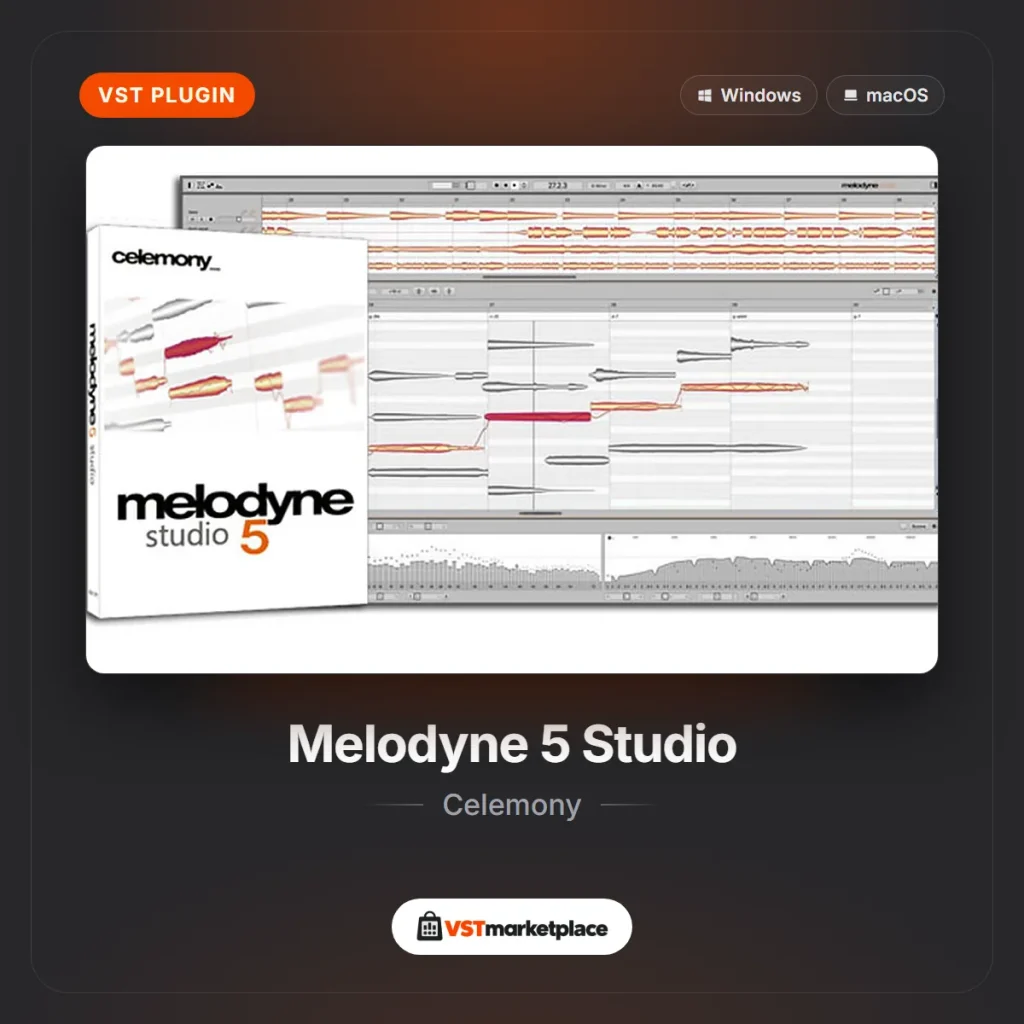
Celemony Melodyne 5 Studio pitch editing interface on the VSTmarketplace product image
Celemony Melodyne 5 Studio £399.00 £499.00 Save £100.00